Never Drop a Conversation.

Chattrik’s Chat Transfer ensures every customer reaches the right agent at the right time—without repeating themselves or losing momentum.

What Is Chat Transfer?

Chat Transfer is a powerful live chat capability that allows agents to smoothly hand off active conversations to other agents or teams when needed. Whether it’s escalation, specialization, or availability, Chattrik ensures the conversation continues seamlessly—with full context intact—so customers always receive accurate and timely support.

How It Works

Transferring chats in Chattrik is fast, intuitive, and context-aware. Agents can reroute conversations instantly without disrupting the customer experience.

  • Select the appropriate agent or department
  • Transfer the chat along with full conversation history
  • The new agent joins instantly without restarting the chat

The customer stays engaged while the right expert takes over in real time.
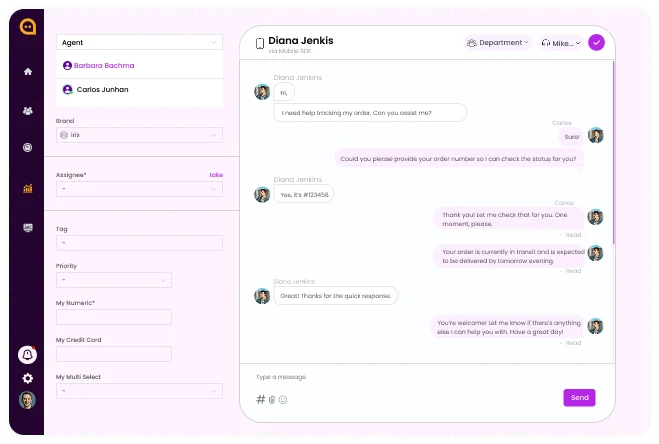
Chattrik live chat dashboard showing option to transfer a conversation to another agent.
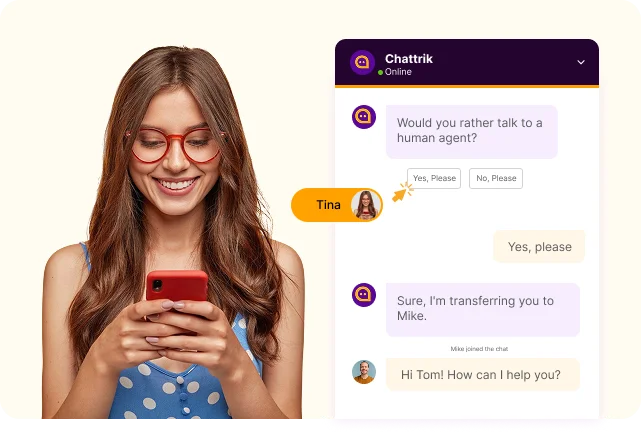
Illustration showing a customer using a mobile phone to request a chat transfer from a bot to a human support agent.

Smooth Handoffs That Feel Invisible to Customers

With Chattrik’s Chat Transfer, conversations never feel interrupted or fragmented. Agents can transfer chats internally while preserving the entire conversation history, visitor details, and context. This enables the receiving agent to pick up exactly where the previous one left off—reducing resolution time, eliminating repetition, and maintaining a professional, human experience for every visitor.

Route conversations smarter and resolve issues faster with Chattrik’s Chat Transfer.

Why Chat Routing Is Essential

Customers expect fast, accurate answers—and businesses need flexibility to deliver them.

Faster Resolutions Icon
Faster Resolutions

Move chats instantly to the right agent for quicker problem-solving.

No Context Loss Icon
No Context Loss

Full chat history stays intact during every transfer.

Specialist Routing Icon
Specialist Routing

Send conversations to agents with the right expertise.

Improved Customer Experience Icon
Improved Customer Experience

Customers never need to repeat themselves.

Better Team Collaboration Icon
Better Team Collaboration

Agents work together seamlessly across teams.

Reduced Agent Load Icon
Reduced Agent Load

Balance workloads by transferring chats efficiently.

Professional Brand Image Icon
Professional Brand Image

Smooth handoffs reflect a well-organized support operation.

Higher Customer Satisfaction Icon
Higher Customer Satisfaction

Faster, smarter conversations lead to happier customers.

What Our Clients Say

Our clients love how much time and effort Chat transfer save, making every conversation faster, smoother, and more effective.

Emily Carter Customer
Emily Carter

Customer Support Manager

“Chat Transfer in Chattrik completely changed how our team collaborates. Conversations move smoothly, and customers never feel the switch.”

Michael Thompson Customer
Michael Thompson

Head of Customer Experience

“Our resolution time dropped significantly once we started using chat transfer. It’s simple, fast, and extremely reliable.”

Sarah Williams Customer
Sarah Williams

Operations Director

“Chattrik makes internal handoffs effortless. Every agent has full context, which keeps conversations professional and efficient.”

Daniel Roberts Customer
Daniel Roberts

Support Team Lead

“The ability to route chats to specialists instantly has improved both agent confidence and customer satisfaction.”

Jessica Miller Customer
Jessica Miller

Customer Success Manager

“Customers love that they don’t have to repeat themselves. Chat Transfer makes our support feel seamless and human.”

Andrew Johnson Customer
Andrew Johnson

Product Support Manager

“This feature alone has elevated our support workflow. It’s essential for any growing team.”

Frequently Asked Questions

Have questions? We’ve got answers. Here are the most common things people ask about Chattrik.

Chat transfer facilitates agents to redirect a chat to other agent or department as and when they require it.
The reason you should transfer a chat is because your customers are redirected to the department member who is the most well-qualified.
In a chat transfer, the customer is connected, while his chat is transferred to a relevant agent.
Definitely yes, chats could be diverted to the desired department in just few clicks.
Yes, the conversation history would be visible to the chat transferring to other agent.
Yes, a chat transfer makes customer feel more satisfied and they need not to repeat their query again and again.
The internal chat history notes feature lets you add notes before transferring the chat, so the other agent has sufficient knowledge about the customer query.
This varies from user role and permissions allocated to agents by Chattrik admin.
A conversation can be transferred again and again till customer query is resolved by a concerned person or department.
Yes, a chat transfer helps customers quickly reach the person most adept to answer their questions, reducing overall time taken to resolve the issue.
This is one feature which is very easy to use and a transfer can be done during live chat.
Transferring of chats facilitates better collaboration among employees and improves response time, customer service and overall productivity.

Stay in the Loop with Chattrik

Get product updates, feature launches, and exclusive offers straight to your inbox.

WhatsApp Chat